
Hours
| Grounds & Trails | 7 am – 7:30 pm, daily (March-October) |
| 7 am – 6 pm, daily (November-February) | |
| Nature Center | 9 am – 4 pm, daily |
| January 1 | New Year’s Day |
| February 14 at 2 pm | Tapas on the Trails |
| March 8 at 12:30 pm | Pup Crawl |
| April 17 at 3 pm | Alfresco Gala |
| May 25 | Memorial Day |
| July 4 | Independence Day |
| September 7 | Labor Day |
| October 17 | ArBOOretum |
| November 26 | Thanksgiving |
| December 24 at 12 pm | Christmas Eve |
| December 25 | Christmas Day |
Dates listed in italics indicate grounds and building closure.
Address
| Woodway Entrance 4501 Woodway Dr. Houston, TX 77024 | 610 Entrance 120 W Loop N Fwy Houston, TX 77024 |

Parking & Transportation
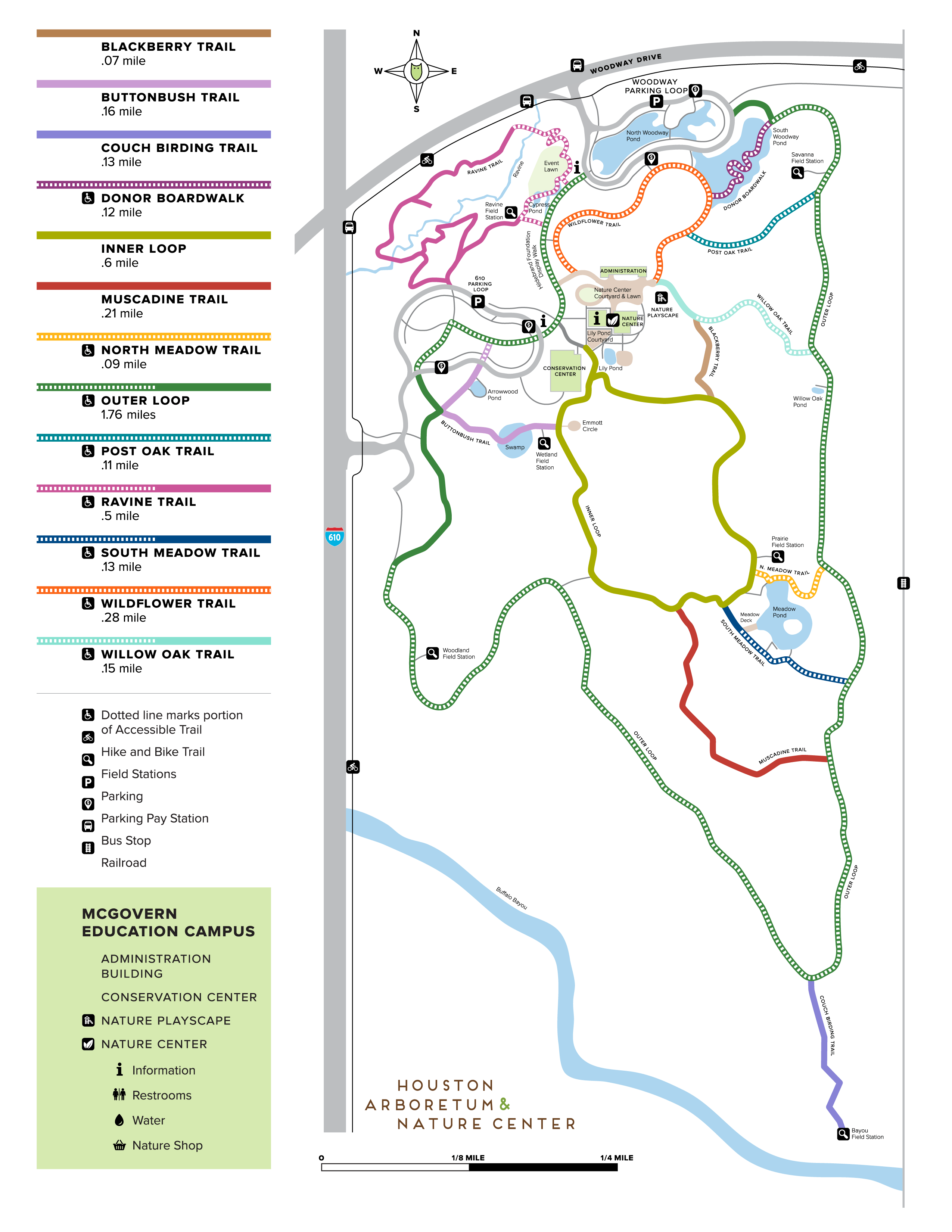
Parking is available at both the 610 Entrance and the Woodway Entrance.
School bus parking for School Tours is available on the 610 Parking Loop.
Help reduce theft. Please remove all valuables from your car.
Arboretum Members receive free parking. Become a Member today!
All revenue from parking fees goes directly back to the Arboretum to continue to restore much needed native habitat and provide nature education experiences for Houstonians and out-of-town visitors alike. The Arboretum does not receive tax money for maintenance and operations, so these funds will help keep the Nature Center and trails free and open to the public daily.
Parking is free for Arboretum Members and free for all visitors on Thursdays. To become a Member, please visit our Membership page.
If you are a Member, your parking code can be found at the top of your Membership Order Confirmation email, in the highlighted area. You can use your code at the parking meter, through the ParkHouston / ParkMobile app, or on the scan to pay option.
To use your code on the Parking Meter:
- Press any button to start
- Follow the “Pay by Plate Enter License Plate” prompt and press OK
- Once you have entered your license plate, press 1 for Coupon Code
- Enter your Member parking code and press OK
To use your code with the Parking QR Code (ParkWhiz):
- Open your phone’s camera and scan the parking QR code on the parking signs.
- Enter your license plate, state, and phone number.
- Select “Apply Discount” and enter your Parking Code.
- Enter your email address and click “Confirm Parking.”
You will need to start a new parking session each time you visit.
To use your code in the ParkHouston or ParkMobile app:
- Open the ParkHouston or ParkMobile App
- Select the correct parking zone:
- 610 is 3410
- Woodway is 3411
- Add your vehicle and click “Proceed To Checkout”
- You will be required to add a Payment Method, but you will not be charged
- Under Price, click “Add Promo Code” and enter your Member parking code
- Once the Price shows zero, click “Start Parking”
- You will need to start a parking session each time you visit, however the App will remember your parking code so you only need to enter it once per year.
Printable Parking Pass:
You can also place a printable Parking Pass on your dash during your visit.
From Your Confirmation Email:
- Your parking code appears at the top of the email, highlighted
- Your printable parking pass is attached to the email
From Your Membership Account:
- Log in and click View Your Orders
- Select your order number
- Your parking code appears at the top of the order, highlighted
- Click Print at Home to download your printable parking pass
No – per City of Houston policy, all individuals with a disabled parking placard or license plate must pay for parking while parking in a metered parking lot.
Yes. There are multiple Metro Bus Lines with stops near the Arboretum. Visit the Metro website to learn more.
For assistance with the parking meters or ParkHouston app, please call 713-840-7275.
For questions regarding parking fines and fees, please call Platinum Parking at 972-362-1152.
Top photo credit Charles Mayer Photography